Microsoft Dynamics 365 Business Central Preparing GST/BAS
How to Prepare GST/BAS in Business Central
This guide provides information on how to prepare Goods and Services Tax (GST) and Business Activity Statement (BAS) in Australia using Business Central.
Managing Business Activity Statement (BAS)
A Business Activity Statement (BAS) is a form that businesses must submit to the Australian Tax Office (ATO) on a monthly or quarterly basis. BAS reports both the total Goods and Services Tax (GST) collected from sales activities—which must be paid to the ATO—and the total GST paid on purchases which is claimed as an input tax credit.
Filing BAS Electronically
When you file your BAS electronically, you must perform the following tasks:
- Go to BAS Report List and choose New.
- Press enter to autofill the No..
- Specify the Version.
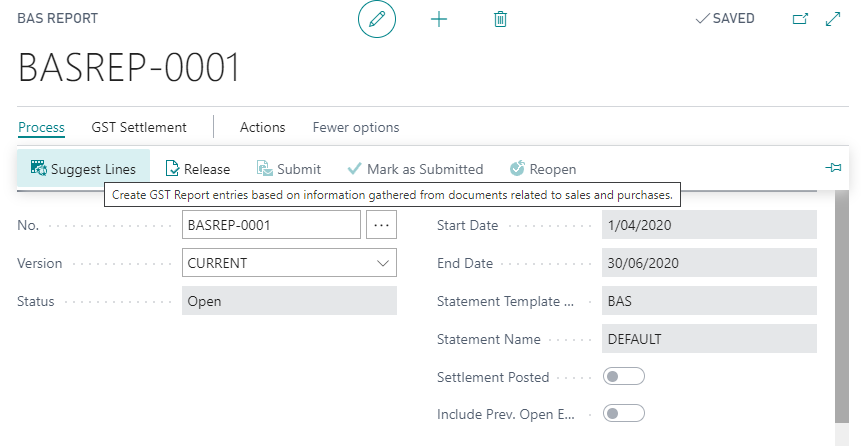
- Choose Process > Suggest Lines and fill in the request form as needed. Notice that it is calculating on the correct period. Choose Month and Period 3 for March as an example. Be sure to select the right Statement Template and Name.
- Choose OK.
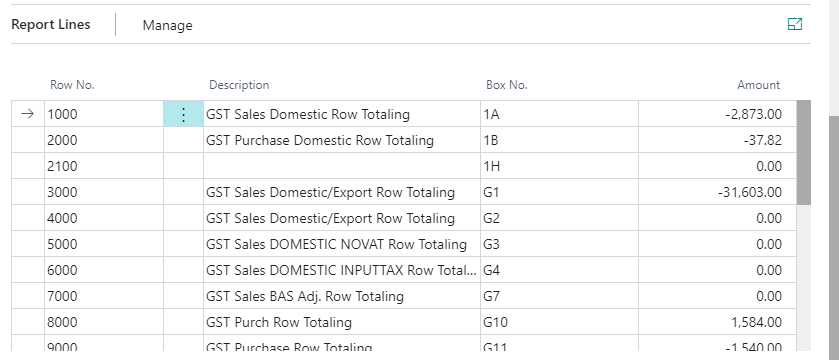
- You’ll now see Return Lines containing data. (Make sure the GST Statement Template has been setup)
- Release the BAS Report. Process > Release.
- Submit the BAS Report. Process > Mark as Submitted.
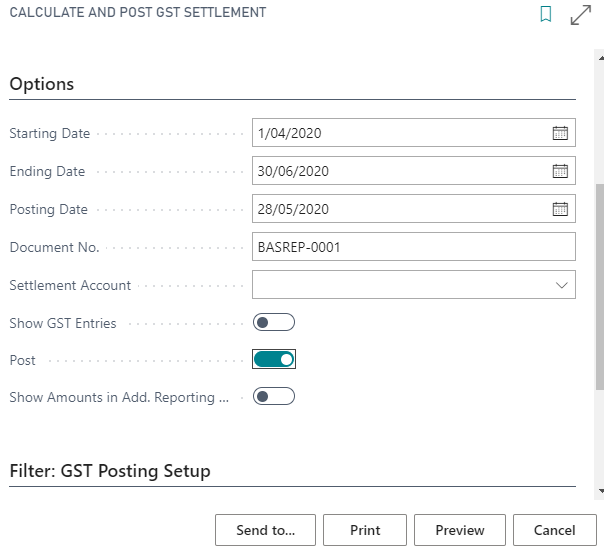
- Finally, choose GST Settlement > Calculate and Post GST Settlement.

Manage BAS Setup Template
To manage the BAS Setup Template, follow these steps:
- Open GST Statement and choose the template that needs to be setup.
- For each row, choose the GST amount that need to be calculated.
- Sum the total row to align with ATO requirement.
- Make sure all GST entry is included in the row.


Suggest Lines for BAS Report
Use Suggest Line to calculate GST entries for certain periods:
- Choose Process > Suggest Lines and fill in the request form as needed. Notice that it is calculating on the correct period. Choose Month and Period 3 for March as an example. Be sure to select the right Statement Template and Name.
- Choose OK.
- You’ll now see Return Lines containing data. (Make sure the GST Statement Template has been setup).
Calculating and Posting GST Settlement
To calculate and post the GST Settlement:
- In the BAS Report, to release the BAS Report choose Process > Release.
- To Submit the BAS Report, choose Process > Submit.
- Finally, choose GST Settlement > Calculate and Post GST Settlement.
- Fill up doc no and settlement acc and enable post to post the settlement.


Last updated on