Extending Microsoft Dynamics 365 Risk Management Implementing a Compliance Register
“AN ENTITY TABLE TO TRACK LEGISLATION AND COMPLIANCE EVALUATIONS PER RISK”
Compliance Register Overview
A Compliance Register is a structured repository that links specific risks to applicable legislative requirements. By integrating this feature within Dynamics 365, organisations can associate each risk record with detailed compliance information, including relevant legislation, reference links, legislation type, compliance status, and evaluation dates. This integration promotes proactive compliance management and supports audit readiness.
Designing the Compliance Register Entity Table
To implement a Compliance Register within Dynamics 365 for Risk Management, a custom entity table should be created. This table will serve as a child or associated entity to the existing risk records, ensuring each risk can be mapped to one or more compliance obligations.
Recommended Entity Table Structure
Here is a suggested structure for the Compliance Register entity table.
| Field Name | Data Type | Description |
|---|---|---|
| Compliance Register ID | Auto Number / GUID | Unique identifier for each compliance record. |
| Risk Reference | Lookup (Risk Entity) | Links the compliance record to a specific risk. |
| Legislation Title | Text | Name or title of the legislation or regulation. |
| Legislation Weblink | URL | Direct link to the legislation or regulatory document. |
| Legislation Type | Option Set | Type (e.g., Act, Regulation, Standard, Code of Practice). |
| Compliance Status | Option Set | Status (e.g., Compliant, Non-Compliant, Under Review, Not Applicable). |
| Date of Compliance Evaluation | Date | Date when compliance was last evaluated. |
| Next Evaluation Date | Date | Scheduled date for the next compliance evaluation. |
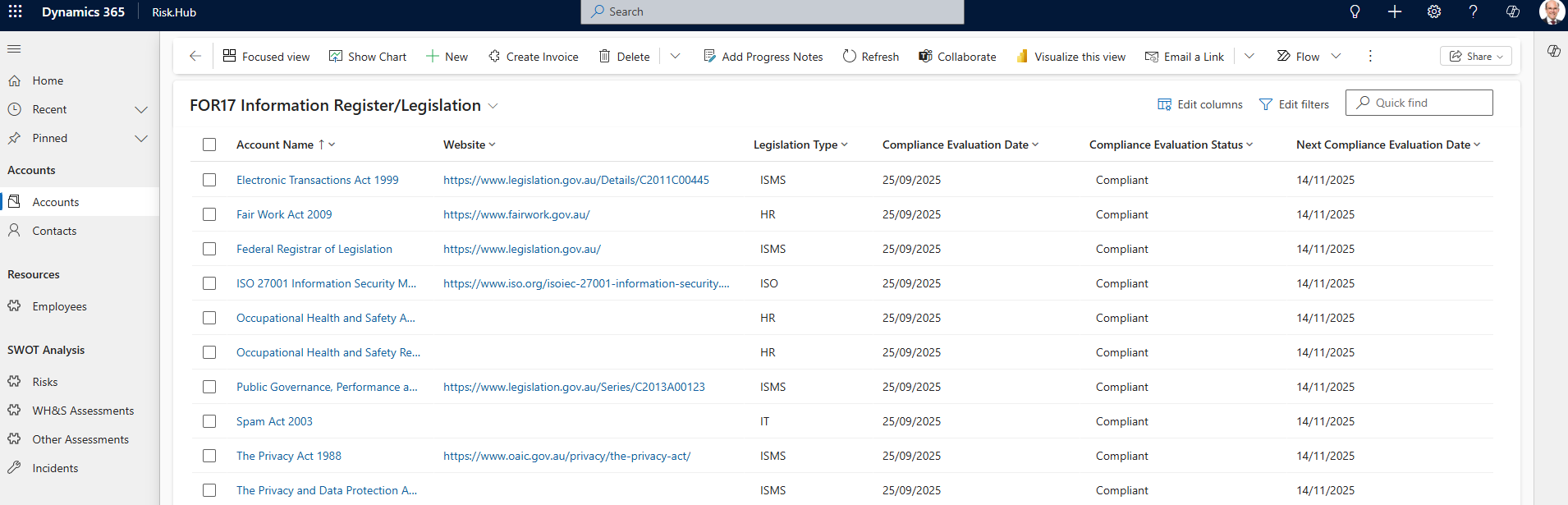
Sample Compliance Register List View
Here is an example of how the Compliance Register list view might appear within Dynamics 365, showcasing key fields for quick reference and management.
Implementation Steps
Custom Entity Creation:
- Use the Dynamics 365 Power Platform to create a new custom entity/table named “Compliance Register”. Ensure this entity has a lookup relationship to the Risk entity/table.
Field Configuration:
- Configure the fields as described above, using appropriate data types and option sets for consistency and reporting.
Form and View Customisation:
- Customise forms and views to enable users to easily add, view, and update compliance records for each risk. Consider adding sub-grids to the Risk entity form to display related compliance records.
Automation and Workflows:
- Implement business rules or workflows to send reminders for upcoming compliance evaluations, flag non-compliant statuses, or escalate overdue evaluations.
Reporting and Dashboards:
- Create reports and dashboards to provide visibility into compliance status across risks, upcoming evaluation dates, and legislation coverage.
Sample Use Case
Suppose an organisation identifies a risk related to workplace health and safety. Using the Compliance Register, the risk record can be linked to the “Work Health and Safety Act 2011” with a direct weblink to the official legislation, classified under “Act”, with the current compliance status set to “Compliant”. The register would also record the last evaluation date (e.g., 01/09/2025) and schedule the next evaluation for 01/03/2026.
Benefits of the Compliance Register Extension
-
Centralises compliance obligations for each risk, improving traceability and accountability.
-
Facilitates timely compliance evaluations and proactive management via reminders and dashboards.
-
Supports audit and regulatory requirements by providing a clear record of compliance activities linked to risks.
-
Enables rapid response to legislative changes by updating linked compliance records.
To learn more about d365 Risk and Incident Management solution
Visit on Microsoft AppSource Risk Management for Microsoft Dynamics 365