Legal User Guide for Microsoft Dynamics 365
Legal Case Management Section
Billing Overview
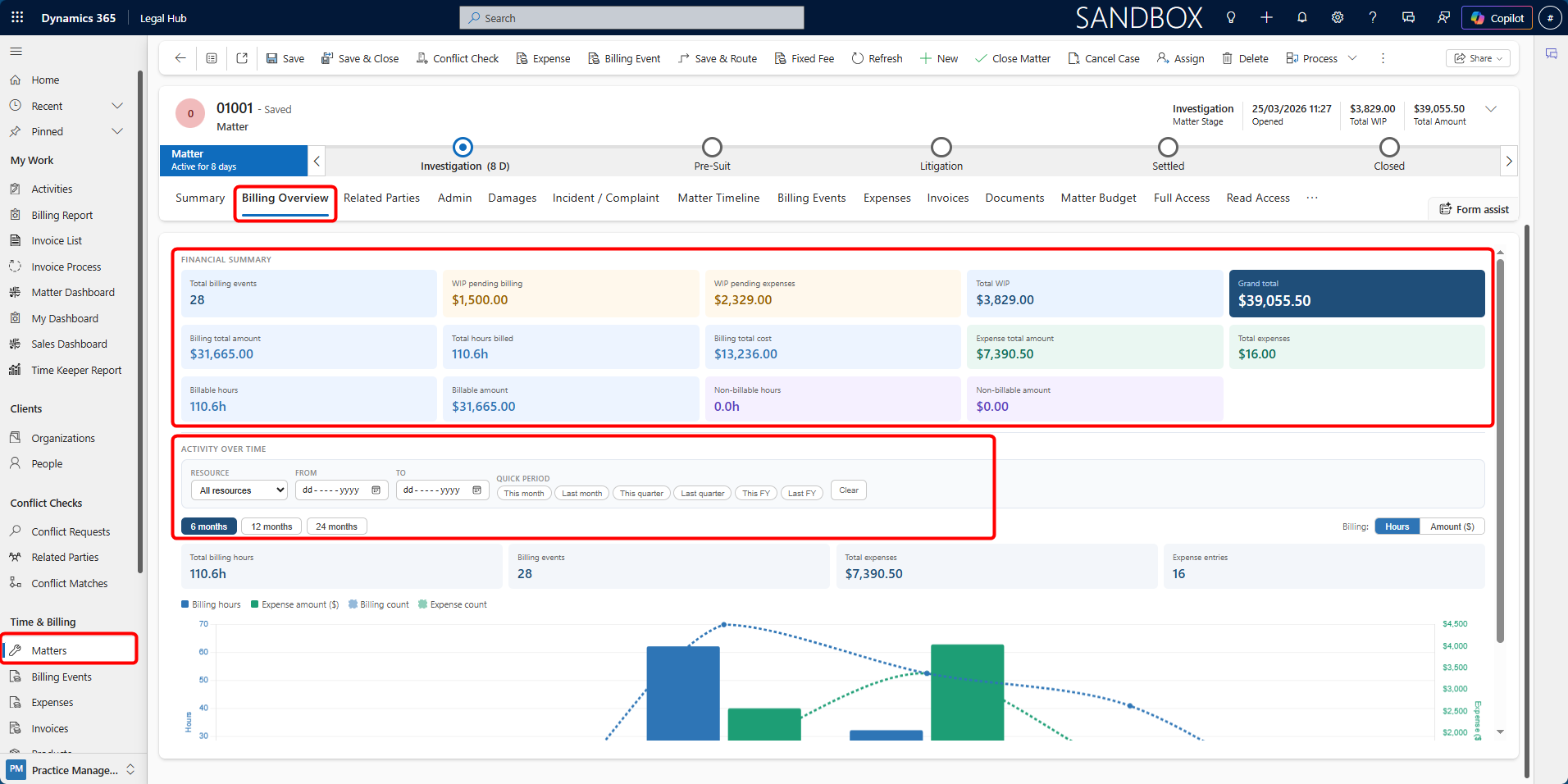
The Billing Overview tab provides a consolidated financial summary of the Matter. It gives users a quick view of billing, expenses, work-in-progress (WIP), and overall financial performance without needing to navigate through multiple tabs.
This tab is typically used to:
-
Monitor overall financial performance of the Matter
-
Review billing and expense status
-
Track work-in-progress before invoicing
-
Identify pending billing or expense items
-
Review financial totals before closing a Matter
The information shown in the Billing Overview may vary depending on the Matter’s Billing Type. For example, Per Diem (Time & Charges) matters are usually driven by recorded time and billing events, while Fixed Fee and Contingent Fee matters may include billing values generated from fixed fee schedules or settlement-based billing.
Financial Summary
At the top of the tab, a set of summary cards display key financial metrics, including:
-
Total Billing Events — Number of billing entries recorded against the Matter.
-
Total Hours Billed — Total billable hours logged.
-
Billing Total Amount — Revenue generated from billing events.
-
Expense Total Amount — Total value of recorded expenses.
-
Total WIP — Combined value of pending billing and expenses.
-
Grand Total — Overall value including billing and expenses.
Additional indicators may include:
-
WIP Pending Billing
-
WIP Pending Expenses
-
Billable vs Non-billable hours and amounts
-
Approved, invoiced, or paid billing values, where applicable
These values update automatically as billing events, expenses, fixed fee instalments, contingent fee billing events, and invoices are recorded or processed.
Billing Overview and Billing Types
The Billing Overview should be reviewed together with the Matter’s billing setup.
Depending on the Billing Type:
-
Per Diem (Time & Charges) matters are usually billed from time entries and billing events.
-
Fixed Fee matters are billed from fixed fee schedule instalments once they are raised into billing events.
-
Contingent Fee matters are billed from a settlement or judgment amount once the contingent fee billing event is created.
-
Retainer matters may include recurring or retainer-based billing events.
The Billing Type is managed from the Financial tab. Fixed Fee and Contingent Fee billing are explained in more detail later in this guide.
Activity Over Time
The lower section of the tab provides a visual breakdown of billing and expense activity over time.
Users can analyse:
-
Billing hours
-
Billing amounts
-
Expense amounts
-
Number of billing and expense entries
-
Trends in work-in-progress and invoiced amounts
Filters allow users to refine the data by:
-
Resource
-
Date range
-
Quick periods, such as This Month, Last Month, or This Quarter
Users can also adjust the time range, such as 6 months, 12 months, or 24 months, to view trends over different periods.
Reviewing the Billing Overview
To review the Billing Overview for a Matter:
-
Open the required Matter.
-
Select the Billing Overview tab.
-
Review the summary cards at the top of the tab.
-
Review the activity charts and trends in the lower section.
-
Use filters to narrow the data by resource, date range, or period.
-
If further detail is required, open the related tabs such as Billing Events, Expenses, or Invoices.
The Billing Overview should be reviewed before generating invoices and before closing a Matter, to help confirm that all required billing and expense items have been processed.