Legal User Guide for Microsoft Dynamics 365
Legal Case Management Section
Matter Structure and Tabs
The Matter form is structured into key sections and tabs that provide a complete overview of the case, financials, and related activities.
Business Process Flow (Matter Lifecycle Guidance)
Each Matter includes a structured Business Process Flow (BPF) displayed at the top of the record.
The configured stages are:
- Investigation
- Pre-Suit
- Litigation
- Settled
- Closed
The Matter progresses through stages using the Next Stage control in the process flow.

Matter Header
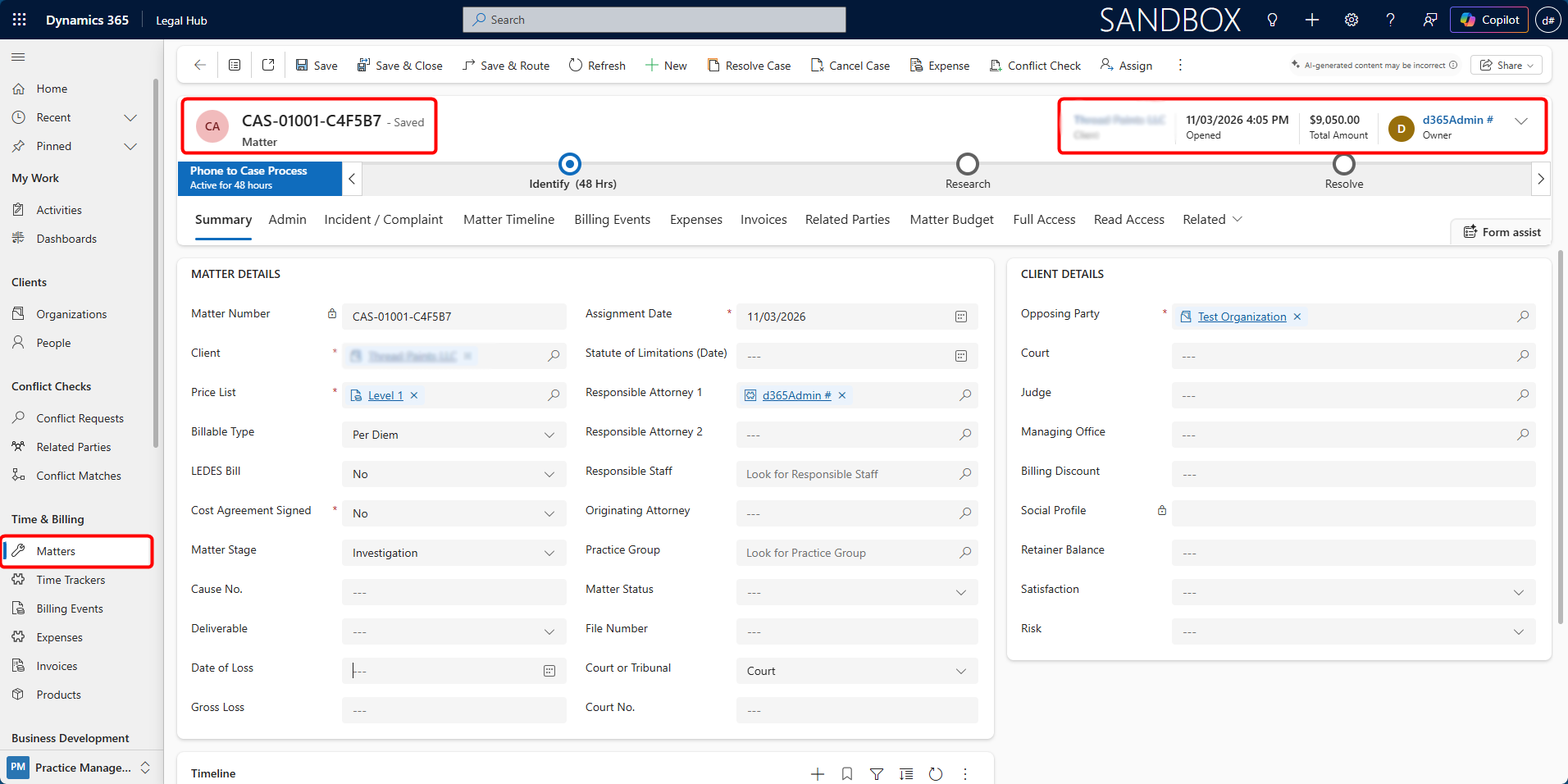
At the top of the Matter record, a summary header provides key information at a glance.
-
Matter Name / Number (e.g., MAT-01070-M3N0T9): Indicates the unique reference for the case (can be configured).
-
Client Name: The primary client linked to the Matter.
-
Opened Date & Time: When the Matter was created/opened.
-
Total Amount: Combined total of approved Billing Events and Expenses.
- Total Expenses and Billing: The Total Amount shown in the header reflects cumulative billing from approved time entries and expenses, and updates automatically as Billing Events and Expenses are processed.
-
Owner: The user responsible for managing the Matter Header
At the top of the Matter record, a summary header provides key information at a glance.
-
Matter Name / Number (e.g., MAT-01070-M3N0T9): Indicates the unique reference for the case (can be configured).
-
Client Name: The primary client linked to the Matter.
-
Opened Date & Time: When the Matter was created/opened.
-
Total Amount: Combined total of approved Billing Events and Expenses.
- Total Expenses and Billing: The Total Amount shown in the header reflects cumulative billing from approved time entries and expenses, and updates automatically as Billing Events and Expenses are processed.
-
Owner: The user responsible for managing the Matter.
Matter Tabs
Each Matter record is organised into structured tabs to separate operational, financial, and administrative information.
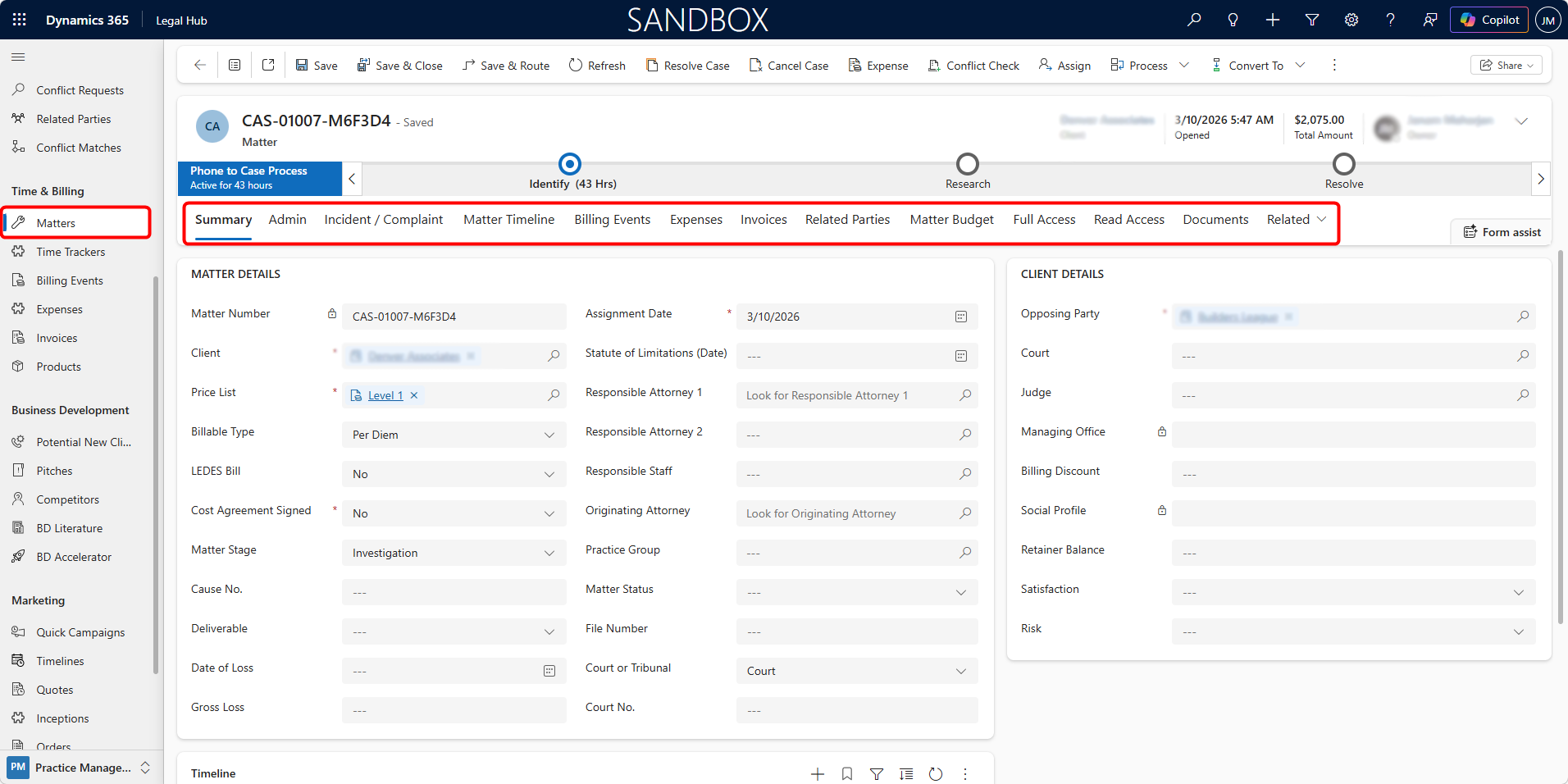
The primary tabs available within a Matter include:
-
Summary: The core overview of the Matter. Contains key information such as Client Details (Client and opposing party information),** Matter Details** (Practice Group, Matter Type, Matter Status, File Number, and other information), and Timeline to track all emails and other activities. This tab provides the primary legal and contextual details of the case.
-
Billing Overview: Provides a summary of the Matter’s billing position, including work in progress, billing totals, and financial status.
-
Admin: Contains administrative and financial configuration fields, including Matter Owner, Price List, Expected Matter Value, Linked Pitch, Origin, Follow-up dates. Used for internal governance and financial control.
-
Damages: Used to record damages-related information where applicable to the Matter type.
-
Incident / Complaint: Captures the background and initial issue details, including Date opened, Expected resolution, Problem description, Instructions, Liability coverage (if applicable). Used primarily for intake clarity and dispute documentation.
-
Matter Timeline: Centralised activity history for the Matter. Provides chronological visibility of case progression.
-
Billing Events: Tracks billable time entries recorded against the Matter. Includes Activity type, Task and phase codes, Hours (billable),Assigned resource, Billing status. This is the primary driver of revenue generation.
-
Expenses: Records non-time-based expenses and disbursements such as Travel, Court fees, Vendor expenses, Filing charges. Supports accurate expense recovery and profitability tracking.
-
Invoices: Displays invoices generated against the Matter and supports invoice management. Provides visibility of Invoice status, Amounts billed, Payment tracking.
-
Related Parties: Lists all associated participants in the Matter, including Client, Opposing Party, Roles and sides. Supports legal relationship clarity and conflict tracking.
-
Matter Budget: Displays budget allocations associated with the Matter. Enables tracking of budgeted amounts, approved spending, invoiced values, and remaining budget across different phases and assigned resources. Helps monitor financial control and spending against the Matter.
-
Full Access: Lists internal users who have full access rights to the Matter. Users added here can view, edit, and manage Matter records including billing events, expenses, and related information.
-
Read Access: Provides read-only access to selected users. Individuals listed in this section can view Matter information and activities but cannot modify or create records.
-
Documents: Provides access to Matter documents stored through the connected document management location, such as SharePoint.
-
Financial: Used to manage the Matter’s financial setup. This is where users set or review the Billing Type, which controls how fees are calculated and how the Matter becomes eligible for invoicing.
-
The Billing Type may include:
-
Fixed Fee
-
Contingent Fee
-
Per Diem
-
Retainer
-
-
The selected Billing Type determines which financial fields are used, how billing events are created, and how the Matter appears in invoice processing and billing dashboards.
-
Related: Provides access to additional related records connected to the Matter.